Grammarly review – free versus premium paid, which is better?

Hi everyone, Eran here. Today I want to talk to you about an online tool that will help you acquire clients, increase sales, and immediately improve the quality of your work. It’s called Grammarly.
What exactly is Grammarly?
It’s is a free online service that finds the errors in your writing—you know, the fun stuff like mistakes in grammar, spelling, punctuation, word choice, and style. Minor though these mistakes may seem, they matter. Whether you’re writing a short email to a client, composing a pitch to increase sales, or creating a pdf to sell online – you want your work to sound professional. You need Grammarly.
Who is Grammarly for? Anyone who writes. Whether you’re an entrepreneur, a real estate agent, a teacher, or a florist, chances are, at some point or another, you need to communicate your ideas through writing. Grammarly ensures that the work you put forward is professional, coherent, and clear.
When I was first building my business, I sometimes struggled to communicate my ideas and products effectively because grammatical and stylistic errors detracted from my work. Not anymore. Now, I’m able to focus on what I do best – helping people – and I let Grammarly worry about the commas and run-on sentences. The tool is an easy, efficient way to communicate more effectively.
Writing that’s full of errors – mixing up their, they’re, and there, or constantly writing in the passive voice – detracts from your message. And your message is what matters most. Regardless of what you’re writing, whether it be an email, a Facebook post, a blog, or a letter to your congressman, the way you articulate your message impacts the way your audience receives it. Don’t let sloppy mistakes get in the way of the important work you’re doing in the world.
It’s no secret that our attention spans are limited. Extremely limited. One of the best features of Grammarly is that it not only corrects mistakes like whether to use a semicolon or a comma, but also alerts you when you’re unnecessarily wordy. For instance, why say “on a daily basis” when you could say “daily”? Why use clunky, bulky phrases like, “a presentation was given by me” instead of “I gave a presentation”? Bottom line: Don’t waste the reader’s time.
So, what differentiates Grammarly from, say, the squiggly red lines on Microsoft Word? A lot. For starters, Grammarly goes well beyond simple spelling and grammar mistakes. One of my favorite features is the Tone Detector, which assesses the level of formality, friendliness, and emotion of your text. When writing online, the tone can sometimes be difficult to detect; we’ve all been on the receiving end of some passive-aggressive-sounding emails, right? Grammarly’s Tone Detector provides a reality-check for your writing, helping you to gauge ahead of time how readers will receive your message. This can save you many headaches and misunderstandings!
So, how much will Grammarly set you back? Nada. The free version provides immense value, and you can easily add it to your browser as an add-on. However, Grammarly also offers several tiers of paid services for businesses, educational institutions, and entrepreneurial hustlers like us. Grammarly’s premium version assesses the readability and concision of your writing while also offering enhanced vocabulary suggestions and comprehensive plagiarism detection to ensure that your words are unique and your content is as original as possible.
Further, the premium version doesn’t just offer suggested changes; it also tells you why. You don’t need to be a grammar nerd to appreciate a simple, straightforward explanation of why you should consider making a given change. The best part? You become a better writer in the process. It’s true—85% of Grammarly Premium users are now better writers, and 76% find writing more enjoyable now. Those are impressive stats.
If you’re still on the fence about whether or not to use Grammarly, here are some examples of the service you can expect.
Using the free version of Grammarly, you can download a report that tells you how you’re doing. That report might look something like this:
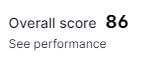
This is what the overall score breakdown looks like:

Eighty-six out of a hundred. Not bad, right? Now, let’s imagine running that same block of text through Grammarly Premium.
As you can see, the feedback Grammarly Premium provides is more specific. Take, for instance, this “hard to read sentence”:
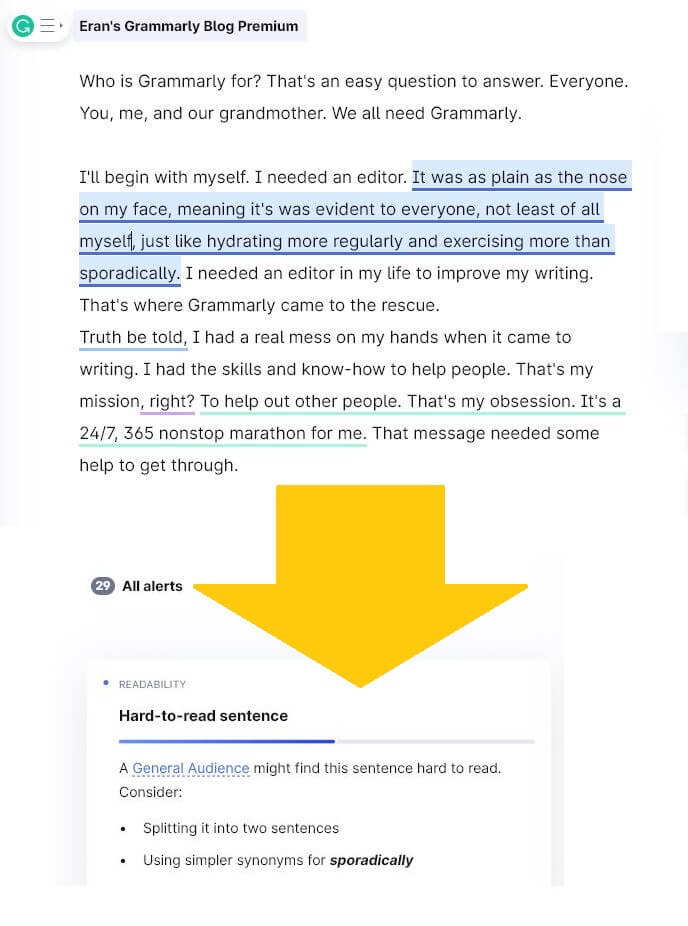
If a sentence is hard to read, guess what? A reader will stop reading it. Your message gets missed.
Here is another good note from Grammarly Premium:
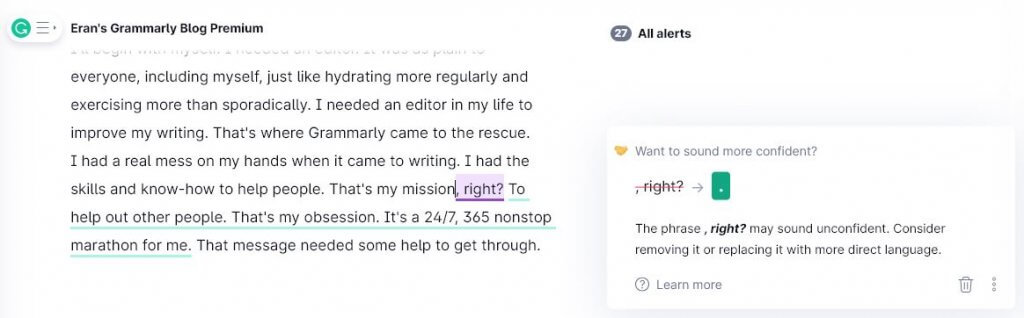
We want our copy to sound bold and confident, so this feedback from Grammarly is spot-on. While I might not have guessed that a word like “right?” could make me sound unconfident, Grammarly continually looks out for little ways like this to make a significant impact on my writing.
So, to summarize, here’s what Grammarly offers:
– Spelling, grammar, punctuation, and style checks to ensure that your work is always professional and high-quality
– Tone detection to assess whether your text has the right attitude and is worded correctly for your audience
On top of this, the premium version also offers services such as:
– Enhanced vocabulary recommendations to make your writing sound sophisticated and native English
– Readability assessment to make sure your message gets delivered to your audience as clearly and concisely as possible
– Plagiarism detection to confirm that your work hasn’t unknowingly borrowed from someone else’s
Whether you’re writing an email, writing your magnum opus, or writing anything in between, Grammarly will make that writing better. Full stop.
[Guest blog by Oskar Bragi, copywriter]


One thought on “Grammarly review – free versus premium paid, which is better?”