My order bump and upsell strategy
I recently did a post in a Facebook group to celebrate having crossed $100K in my first year using Kajabi.
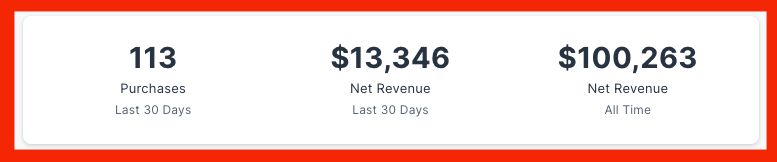
The post got a lot of positive comments and I felt that it is worthwhile sharing this Facebook post on my website as a blog post, and expand further.
The point of the post is to share that the secret sauce to making 100K in a year was utilizing the order bump and upsell features to increase revenue.
Firstly, let’s define the terms:
An order bump is an offer you make just before someone makes a payment for the product they are buying. You simply have a checkbox they can tick and “bump” their order to something extra.
An upsell is an offer you make right after someone made a purchase, on the following page.
Here is what I wrote in the Facebook post (italicized): ?
My annual subscription with Kajabi is renewing tomorrow…
I guess I made my money’s worth?
The most important feature that helped me achieve these results?
OFFERS
The upsell + order bumps portion specifically.
You’d be amazed how much money you are leaving on the table if you don’t have an order bump or an upsell.
And now with Kajabi, there’s a beta feature for multiple upsells too!
Can’t wait to explore those too.
I have one order bump for $99.
63 times someone bought that.
I have an upsell for $497.
10 times people bought that.
It might not be much, but these things really add-up.
The $99 order bump is my favourite, it’s for new customers only and they can buy a 1:1 session with me.
This means not only I get to talk to my customers for the first time (if you’re not talking to your customers, what are you doing?)
I am also getting paid to do so.
Sometimes these become upsell opportunities,
Sometimes you just build a so much stronger relationship which in turn means they open your email,
Read your posts,
Watch your videos,
And at some point they either become a customer for my membership or in many cases,
They just give me a referral,
Which starts the cycle again…
I have mixed feelings about posting income results.
It’s super misleading.
People have no idea how long or short I’ve been in business,
My experience, my niche, what my profits are, etc.
And on the other side, there are people here who are either inspired by it or are bored by it because it’s peanuts to them.
Either way – I wanted to post this to remind you of two things:
(1) Go add order bumps and upsells.
If you don’t have any, come up with something like a 1:1 call with you.
That’s a perfect one no matter who you are.
(2) Talk to your customers!
Understanding their problems, struggles, and challenges are the key to figuring out solutions to help them.
The money will follow.
The aspect of the $99/session was challenged by someone in the Facebook group and they left a comment that basically said my strategy was wrong.
I disagree. ??♂️
And my reply is extremely relevant to my strategy and hopefully gives you the mindset behind it.
For context, here is what they wrote:
The order bump should be digital and an easy “yes” meaning affordable, not a lot of copy/image needed to explain it and no complexity in delivering it. You don’t want the order bump to be a valuable 1:1 call… imagine if you were to scale, how would you fulfill all of this?
Order bump is like a puzzle piece and it has criteria
This is the type of advice that you see in Facebook groups that is just DANGEROUS to your success.
Here is how I responded to that comment: ?
“Thanks for your input [name of commenter].
For anyone else reading this comment – I have some feedback on your point, a different perspective if you will.
You are correct – an order bump should be an easy yes digital product.
That’s what pretty much everyone does.
But what everyone does isn’t always right, and certainly not the only way. And certainly not without knowing what stage of business someone is in.
You are clearly more of a savvy entrepreneur. Maybe you value your time so much that you don’t get on a call with anyone anymore and only do group coaching.
I bought Jeff Walker’s 2K program and the only call he attended was the 45 minutes welcome call.
Everything else was done by his coaches.
Good for you if you are at THAT stage and your time is soo valuable that you don’t talk to your customers unless they pay you 1000s or even 10s of 1000s of dollars for your time.
But if you’re just getting started with an online business in a niche and you haven’t spoken to at least 50 of your ideal customers on Zoom to learn more about them, their challenges, etc.
You’re going to need to get to work and do that.
Otherwise, you’ll never learn about what is going on in your client’s world so you can serve them.In addition to being a vital market research strategy, it is an amazing relationship-building strategy.
Since I’m going to need and want to talk to 50 people or more anyway to learn about them and connect on a deeper level, why not get paid $99 for it every time?
That alone is an extra $5K cash injection to my business that pays for all my software subscription costs just for doing market research.
1 call per week for an entire year.
That’s 2 hours of my time per week to cover all my business overheads.
There is absolutely nothing wrong with that when you’re getting started.
Once you spoke to 50+ people, you’re getting the hang of how to help people, you have acquired customers, and you’ve made a lot more than 5K per year.
Maybe even crossed 100K.
You can just take out the order bump of $99/session anytime and replace it with as you say a digital product to offset the costs of advertising, increase order value, and turn your funnel into a real Self-Liquidating Offer that acquires your customers on autopilot.
But that’s next-level stuff that beginners have no idea when they are getting started.
Heck I’m making multiple 6-figures with no paid ads and I’m figuring out how to get an SLO funnel to work for me still.
That’s my 2 cents. Hope a beginner who is reading this comment finds this valuable.“
Frequently Asked Questions from the post:
Under the original post, people asked great questions and I gave detailed answers.
I wanted to share these with you too.
$497 upsell is a 1:1 sessions with me (two of them),
including a bonus of having my VA go through their Instagram account and create a Google Doc to help them repurpose their captions to other uses such as email marketing, blog posts, etc.
The $497 isn’t much of an upsell for my usual 1:1 services, as I sell my sessions for $500 (2 sessions) but the Google Doc is a one-time only bonus on that page.
So I tell them in the video upfront, there’s nothing special about buying 2 sessions here on this page of elsewhere, but if they want to buy those sessions anyway at some point or now, this is the time as they get this extra little value.
The main product was a tech support membership, price was very briefly $19/month,
Mostly it’s been $49-55/month
I have over 100 people on that membership level.
it’s a tech support membership where I provide under 24-hours tech support for people with their online courses/memberships/funnels/websites
Some needed 1:1 assistance, which is where the higher prices are too, but my prices aren’t high ticket as such
$300 for 1 session
$500 for 2 sessions
$900 for 4 sessions
I sold 3 people 8 sessions for $1500, but most projects are under $900, and the majority are $500
And then there’s the ongoing membership sales
other little bits and pieces like an email marketing guide for $9 (order bump)
that’s about it
I think I did 2 done-for-you website project for the whole year, at about 5K (combined between the two), but that’s rare that I do those.
I mostly do the tech support membership + done-with-you sessions building people’s websites with them on Zoom so they can watch and learn at the same time
there is a code that needs to be added in the checkout settings. Here’s all the info in a google doc, click here 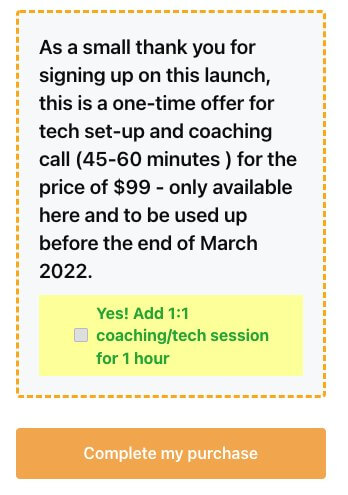
Yes I help people get set up with their courses/memberships
You mean if people ask me why I use Kajabi over others? or if I ask my customers they they use Kajabi over others?
For me personally, I don’t think there’s a one-size fits all, some people should use Kajabi, some people shouldn’t. All depends on the business and requirements.
I personally don’t use only Kajabi, I use other tools as well that do a better job for my requirements in some ways. But I also use Kajabi.
great question! approx 3000
But this is such an important point to give context…
I know people with 40,000 on their email list who don’t make nearly as much as I do…
I know Instagram influencers with 300,000 and even over 1 million followers who don’t make as much as I do…
And I know people with a smaller email list than me, that make a lot more too!
so even a size of email list is somewhat of a vanity metric
It’s all about how good your relationship is with that list
My email marketing is fairly consistent, I email my list weekly, and that’s been the case for at least 2 years.
even when I had really nothing to sell or I was clueless
and I always encourage people on my list to reply to my emails and even hop on a zoom call with me
I estimate I have spoken on zoom to at least 1/4 of my email list
 how long is your call with them for $99?
at times I did it as a full 1.5 hour call, sometimes it was 30 mins, I’ve changed my offer at different times.
Typically when it was a 1.5 hours, it was a website build out session so I’d actually build their site for them on zoom like I would in my standard freelance business
I actually haven’t sold much courses.
I have a tech support membership where offer an under-24 hours tech support
I have about 100 people subscribed to that
And then I have a 1:1 freelance service building websites for people on Zoom while they are watching so they can learn how it’s done at the same time
Kind of a hybrid between done-for-you and tutoring, i.e. I still build their website/funnel/course but they are watching it get done at the same time
Usually it’s 2-4 sessions and they can carry on by themselves or their VA (who is also welcome to attend if they have one)
I do have some courses now that all my members are getting included in the membership for free
But the courses will be sold separately in the coming weeks, maybe couple of months,
i.e. I am going to separate my tech support membership from my courses completely so they are 2 separate income streams/businesses
That’s a great question.
FIrstly, you answered your own question. You’re overthinking it 
Secondly, here is how I have mine (2 different ways).
I have an automated email going out once an offer is purchased with a specific link to my calendar (I use calendly, paid version). They buy. They get an email with a scheduling link. They schedule, we talk. Done.
In some situations, my thank you page and the confirmation email tells them “send me a message on messenger to let me know you purchased so we can schedule a time to talk”. That’s more set up for a specific call that they need to do some preparation before we hop on a Zoom call.
I also have a scenario where someone books a time to talk to my virtual assistant, in that case, I have my VA’s calendar embedded on the thank you page and both my VA and I get automatically notified when a purchase is made so that’s all automated.
My calendly schedule blocks out weekends for me completely.
I DO work on weekends by choice, but I don’t have appointment availability showing on my calendar. That’s all something you can choose.
The beauty of business is lifestyle design.
You can be in control of that by setting up your availability, how many sessions per day you’re willing to do, how much space do you want between calls, etc. That’s all possible with Calendly.
Thirdly, and most importantly, don’t stress over a problem you don’t have. When you have the demand of too many appointments you can start figuring out how to tackle it.
In my most booked out month, I would have over 100 appointments (free consults and paid) – and yeah – that gets way too much and not something you can comfortably do month after month. But that’s an exception.
For example, if you end up with that many appointments, you can afford to create filters on the free consultations like asking a whole bunch of questions in the booking form before you even let them book.
Cross that bridge when it’s time.
An order bump is a small add-on when someone is on your order page (also known as checkout page).
The idea is that after someone enters their credit card details, before they hit “buy” there is a little box that comes up where an option to tick in order to add another add-on to purchase.
The goal is to increase the value of the purchase at checkout.
Very similar to those chocolate bars you see when you checkout at the grocery store.
That’s an order bump but in the real world.
We simply take the same concept and apply it to the online selling process.
My answer is 99% of the time.
In some cases, I worked with someone who is making things more complicated than they should be.
And telling them “add an order bump” is going to lead to another month of them procrastination.
In that case, that’s the 1% of no order bump. Just LAUNCH!
But otherwise, I would say you should definitely add an order bump.
You are leaving money on the table by not adding one.
For example, I sell an eBook for under $10. Beginner’s Guide to Email Marketing.
My order bump is a 1:1 session for an Email Marketing coaching session.
In many cases, people add a small digital product as an order bump. Like templates, or something like that.
It doesn’t need to be anything fancy – but something valuable and give people an option to buy that too while they are going through the purchase option.
It depends on what you are selling.
The point of the upsell is to increase the value of the overall purchase.
And increase the lifetime value of the customer.
You see it many times in paid advertising.
You see a crazy good offer for $4.95 for an eBook with 8 extra bonuses.
You might think “that’s too good to be true”.
The point is, the marketer is making the front-end offer for $4.95 so crazy good because they know that once the person goes through the various upsells, they are probably going to buy more.
A purchase of $4.95 turns into $1K purchase!
This absolutely happens.
In my membership funnel, I had people go through a $49/month subscription checkout page.
They saw an order bump for $99 session and click “yes”.
Then, they saw an upsell for $497 for 2 additional sessions.
Over 10 people said yes to that too.
A $49/month purchase turns into a $600+ dollar sale (with the customer also paying a monthly subscription).
The upsell should be aligned with the original purchase so it aligns and makes sense.
You wouldn’t sell something totally disrelated.
It needs to have logical sequence for people to say yes.